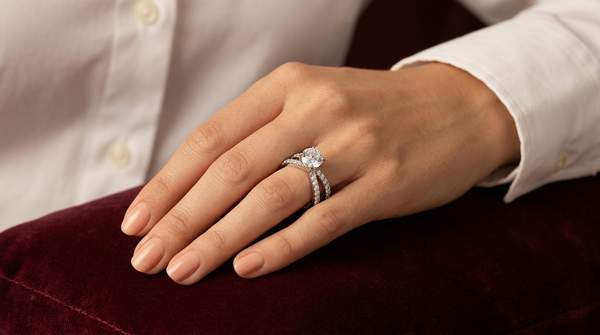
Look down at the Nora and the first thing you may notice after the center diamond is a sliver of skin. The diamond-lined openwork of this open-band engagement ring lets that space show through, so your hand becomes part of the pattern. That sliver gives the small diamonds around the center a shape you can read even when they’re all catching the light.
The platinum Nora setting from Ritani shows off the idea with a radiant-cut center held by four prongs. Its straight sides and clipped corners are easy to pick out among the smaller diamonds. If you love the detail of an elaborate setting, the Nora gives you plenty to linger over after you’ve taken in the silhouette of the center stone.
The Space Around the Stone Changes the View
In a classic solitaire, the eye moves along the band to the stone, usually with little to interrupt it. The Nora gives the eye several lines to follow, with small diamonds making those lines visible and open sections keeping them distinct. When you look down at the ring, the breaks help you see where the frame stops and the center begins.
That effect is especially noticeable on the hand. In a product image against a white background, a gap can almost disappear into the backdrop. Against skin, the opening takes on a shape of its own, and you can see where one diamond-lined section ends and the next begins.
Across a dinner table, the Nora has the presence of a ring with a generous spread of diamonds. Bring your hand back toward you and the detail breaks into separate lines. The change gives the ring a little surprise that belongs mostly to the person wearing it.
The Center Shape Changes the Frame
The radiant gives the Nora a geometric center, almost like a window framed in diamonds. A round stone trades those angular corners for a continuous curve. The shape that looked right on its own can feel different once you put those lines around it.
Ritani also makes the Nora setting for a round center in 14kt white gold and for cushion and marquise centers in platinum. A cushion preserves much of the radiant’s broad outline with softer corners, while a marquise draws the eye along the finger toward two pointed tips. In each version, the openwork gives you a consistent frame for judging the outline before you compare individual diamonds.
Put the platinum radiant and cushion versions side by side and pay attention to the corners first. Keeping the metal and the setting design consistent makes it easier to see how that small change affects the silhouette. Bring in the marquise if you want to see what happens when the center has a much longer axis.
Proportions can change the effect within a single cut. Look at how square or elongated two radiant diamonds are before you compare their weights. An elongated stone emphasizes the line from knuckle to fingertip, while a squarer outline directs more attention across the finger, toward the detail in the setting.
The Ring You See From the Side
From above, you can trace each opening around the stone. The side view gives you a better sense of how the center sits above the lines of smaller diamonds. A perspective view connects the two, showing how those separate lines come into sight as the ring turns.
A band that sits close at the back of an engagement ring can still leave a gap near the setting, where the rings meet at different heights or widths. Look at the side profiles together if you want the rims to touch. A little separation can also let you see a distinct edge on each ring, especially if both have diamond detail.
Think about the two rings together on your hand. A simple companion band gives you an uninterrupted line beneath the Nora’s openwork. A band with stones of its own puts more detail across the finger and gives the two rings a fuller presence together.
The same views can help if you sometimes plan to wear the engagement ring alone. Look at how far the diamond-lined design reaches across the finger from above, then turn to the front view to see how it sits relative to the center. A ring you like from both angles can have as much presence on its own as it does beside a band.
A Few Details to Settle Before Building a Nora
Does Open-Band Mean the Ring Is Adjustable?
Open-band describes the design around the diamond on the Nora. Ritani asks you to select a ring size as part of building the ring, so use the same care you would with any fitted engagement ring.
Is the Center Diamond Included With the Setting?
The Nora setting shown in Ritani’s ring builder is one component of the finished ring. You select a center diamond separately, which lets you settle on the outline and setting you like before comparing individual stones that fit it.
Where Can You Best See the Openwork?
Look straight down to see the outline around the center, then use the perspective or on-hand view to see how much of that pattern reads on a finger. On the radiant version, the 360-degree view brings those angles together as the ring turns.
Put Your Diamond in the Picture
Once you’ve found a setting you love, choosing the center becomes the fun part. Open the Nora in Ritani’s ring builder, try the center shapes that caught your eye, and pick the one you’d love to see when you look down at your hand.